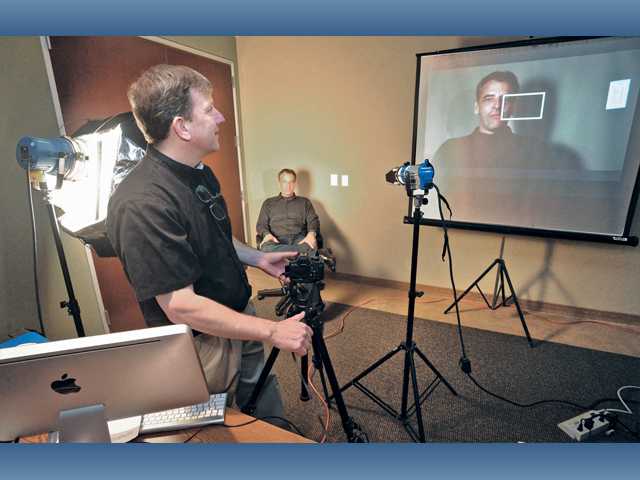
Sally Ellis, a local financial adviser and Realtor, is in the process of revamping her Web presence by developing separate sites for each of her services. She wants those sites to have one common theme: video content.
“I know that video is the thing to have,” Ellis said, explaining that she wants to film client testimonials in particular. “In years past, I was a big photographer, but it’s a new world today.”
Although TV commercials have been around for years, the viewership of the medium has changed, and now, the Internet is the way to reach more people. Web videos can create a better connection to the customers who are using Google to find a business or service.
“Today’s customers expect video,” said Sean McCulley, a video creator editor who opened Mudturtle Media Productions in Santa Clarita in 2008. “You want to convey who you are — and you can do that quickly with video.”
And businesses don’t necessarily have to hire professionals to make this content.
The first thing a business owner needs to consider is the purpose of the videos.
“Who’s your audience?” McCulley said. “Who are you directing this video toward?”
Once a business has considered its vision and audience, it’s important to ensure the video looks professional and clean — which can make or break the effectiveness of the video. People prefer businesses they can trust to do the job well, McCulley said, and a poor-quality video creates the opposite impression.
On Jan. 20, 15 local businesspeople attended a Lunch & Learn through the SCV Chamber, where McCulley went over the five main things to consider when making a business video.
Location and framing
The first thing that throws off a customer is seeing a business video in which the subject is standing in front of a blank background, like a wall, McCulley said. One needs to use the videos as a way to illustrate the business, by showing a busy office in the background, or the warehouse in action, or one of the construction sites.
“What it does is lend credibility,” he said. “It tells the viewer that it is a real place and real business.”
Additionally, avoid perfectly centering the subject in the middle because it makes for a boring visual. Shoot more to the left or right of the subject to allow for more of the environment and background to show through.
Lighting
Typical fluorescent office lighting can reduce the quality of the video. The goal is keep the subjects’ eyes visible and clear, not in shadows or harsh lighting. Try to bring in professional lights — even scoop lights sold at Home Depot will work, along with parchment paper or professional gels to dim the lighting to prevent a harsh light. When outside, position the subject with the sun out of his or her eyes, but also without a shadow going across the face.
White balance
A video can look unprofessional if some scenes and angles are a bluer hue and some are more orange, which can happen if different angles depend on different light sources. To avoid this, one needs to keep the whole scene within the same kind of light, be it natural or fluorescent.
This can be changed post-production, but it’s more difficult to do so. An easy solution is to shoot a large white poster board that fills up the whole frame, and allow the camera to set the whole frame’s white balance against it, so the whole frame’s white balance becomes more even, McCulley said.
Exposure
A camera typically has an automatic function for exposure (how much light is let in), which can overexpose or underexpose certain parts of the scene without your control. McCulley suggests learning how to set the exposure and not relying on the auto function. Typically, the ISO can start at 400 with a shutter speed of 1/60 to 1/100 of a second, and adjust from there.
Audio
Businesses that do their own videos are usually working with a digital camera, and their microphones only pick up audio about two or three feet out. If you need better audio pickup, then either a lavalier mic (which attaches onto the subject), or a shotgun mic will do the trick.
The key to all of the above considerations is to experiment with the conditions to see what works best, McCulley said. With a few takes, you can find the right settings to shoot a video that will result in a professional product for your customers.
More information about Mudturtle Media Productions can be found online at www.mudturtleproductions.com.